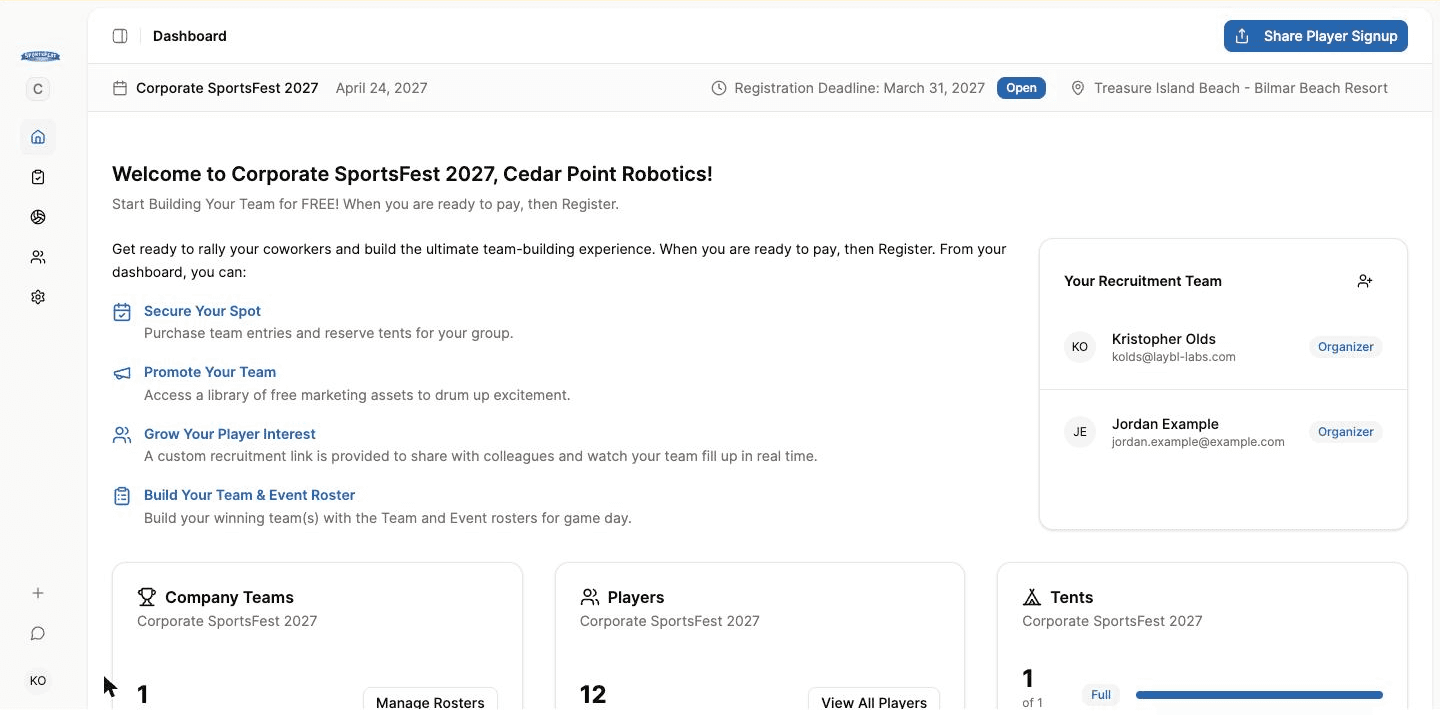
SportsFest Dashboard
I built the registration and payments platform Florida Corporate SportsFest runs on. In its first season, 3,377 players from 116 companies signed up and about $203,000 was paid online with zero failed payments.
- role
- Solo designer and developer (LAYBL Labs)
- client
- Florida Corporate SportsFest
- status
- live
- stack
- Next.js · React · TypeScript · Supabase · Drizzle ORM · Stripe · NextAuth · shadcn/ui · Tailwind · Monorepo · Resend · Vercel
- Players
- 3,377
- Companies
- 116
- Paid online
- ~$203K
- Failed payments
- 0
- Lighthouse
- 95
The problem
Florida Corporate SportsFest is an annual team-building event on the beach. Companies buy team slots, recruit coworkers, and compete in volleyball, tug-of-war, corn toss, dodgeball, and a relay.
Registration ran on a third-party sports event system bolted onto WordPress plugins, and organizers recruited coworkers with PDF flyers. Nothing was connected. The hosts had no clean view of who had signed up or what each company had bought, and organizers built rosters for five events by walking the office asking who wanted to play what.
The new system was signed off in late August 2025 and registration had to open in December. That gave me three months to replace the whole stack.
My role
I was the only designer and developer, working through my studio, LAYBL Labs. I scoped the work with the hosts, designed the screens, built the database, payments, and email, and deployed it. I still maintain and host it.
What I built
- For the hosts: an admin area for each event year's pricing, products, coupons, sponsor invoices, payments, and reports, plus a "view as" mode to see any company's account exactly as its organizer sees it.
- For company organizers: a dashboard to buy team slots and tents, recruit coworkers by link, QR code, or email, and build team and event rosters.
- For players: a branded signup page for each company, where they rank the events they want to play.
Key decisions
Ask players what they want to play when they sign up
The old form collected a name and an email, and the real work came later. Moving the question onto the signup form meant rosters could be built from data instead of hallway conversations. In 2026 that produced 16,885 event preferences from 3,377 players, and organizers filled 3,272 event roster slots from them.
Deposit now, pay the balance later
Companies often want to reserve team slots before their budget is approved. Every order carries a deposit and a balance owed, which let registration open in December for an April event.
Keep sponsorships out of the shop
Sponsors pay negotiated amounts, usually in the thousands, often through an accounts payable department that needs an invoice before anything moves. Treating a sponsorship as a cart product would have pushed all of that into the checkout that 116 companies depend on. Instead, the hosts send an invoice with a secure payment link, sponsors pay by card or bank transfer, and the money lands in the same reports as everything else.
One codebase, three apps
The organizer and admin dashboard, the public signup site, and a public API live in one Turborepo monorepo and share twelve internal packages for the database, sign-in, billing, email, and UI. Every screen is built from one shared library of 76 components, so nothing was designed twice.
Leave documents where the hosts already edit them
Rule sheets and recruiting PDFs stayed in WordPress. A small plugin exposes them and the dashboard pulls them in, so nobody had to learn a new workflow.
The hard parts
Keeping every company's data separate
Every row that belongs to a company also carries its organization and event year, and every query and server action filters by the signed-in user's organization. Because of that, opening 2027 registration meant adding a single event-year row. Supabase row-level security policies sit on the same tables as a second lock on the database's own API.
The isolation is enforced in the app's data layer, which is small and reviewed. On the next project I would make the database itself refuse any query without an organization, so a mistake cannot slip through.
Payments that never get lost
Each payment has three steps. The server checks the cart against the database and applies deposits and coupons, the confirmed payment is recorded, and a signed Stripe webhook reconciles everything as the source of truth. That last step matters for bank transfers, which settle days later. The 2026 season processed 242 payments with none failed or refunded.
Permissions that stay simple
Hosts, company organizers, and players each see different things, and an organizer only ever sees their own company. The company is resolved on every request from the URL and the user's permissions, never stored as "the current company." That is what makes "view as" safe: a host can open any account to answer a support question instead of asking for screenshots.
Results
2026 was the first season on the platform.
- The April event sold out by March.
- 3,377 players from 116 companies registered, on 144 company teams.
- 242 payments went through Stripe, about $203,000 was collected online, and none failed or were refunded.
- 188 orders were self-serve. The hosts created only 18 by hand.
- The busiest signup day brought in 101 players with no downtime.
- 2027 registration opened the week after the 2026 event, and 14 of the first 18 companies to sign up were returning.
- The dashboard scores 95 on Lighthouse.
What I would do differently
- Generate every database migration with the tooling from day one, instead of hand-applying some SQL, so a second developer has nothing unusual to learn.
- Run fewer, larger queries on the admin overview. One query per card gives great loading states but too many round trips on that page.